
iKitesurf: Weather & Waves
WeatherFlowWeather
4.8108.00 Reviews
- Version
- 5.0
- Installs
- 50.00K
- Age Rating
- Everyone
Screenshots
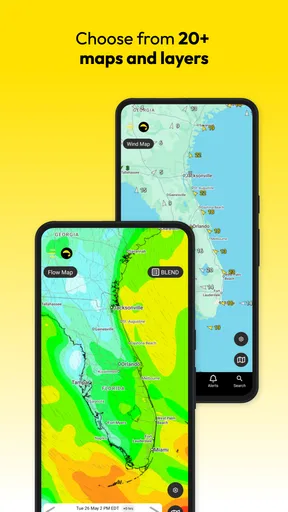
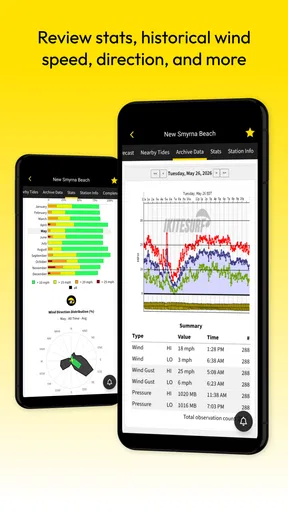
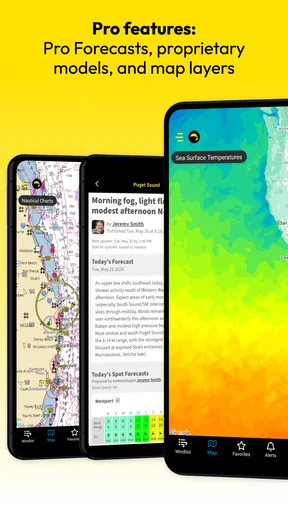
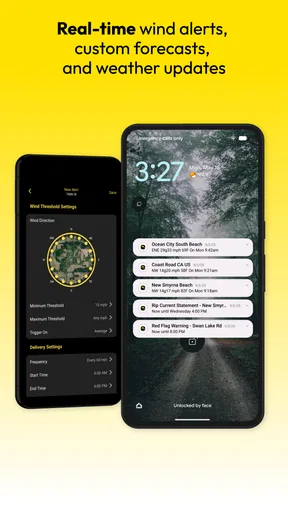
Our Review of iKitesurf: Weather & Waves
 Analysis by Appyee
As a water sports enthusiast, I’ve always been on the lookout for tools that can help me catch the best waves and winds. Enter iKitesurf: Weather & Waves. This app is like a dream come true for surfers, kiteboarders, and windsurfers. Let me walk you through my experience with this handy little companion.
Why the first week feels useful
The appeal is immediate if wind is the main reason you decide whether to go out. Rather than starting with a general forecast for a whole city, I can focus on the conditions that matter to a session: wind, tides, waves, and water temperature. That combination makes the app feel more relevant to a kiteboarding or windsurfing plan than a standard weather app, which is usually built around rain, temperature, and broad daily summaries.
Its Weather category focus is clear, and WeatherFlow is the developer behind it. The app is free to install, and its Everyone age rating makes it accessible to a broad audience. The store describes a kiteboarding and kitesurfing weather service, but I find its practical appeal extends to other wind-dependent water activities too. That does not mean it replaces local knowledge or good safety judgement; it gives me another source to weigh before committing to a session.
First off, downloading and setting up iKitesurf was a breeze. The app installed quickly, and I was able to dive right into exploring its features. The interface is clean and intuitive, making navigation a piece of cake even for the less tech-savvy among us. Within minutes, I was checking out the forecasts for my favorite spots.
The details that help shape a session
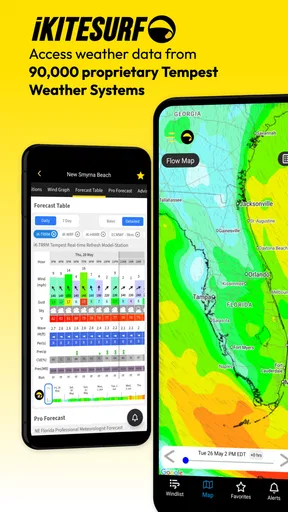
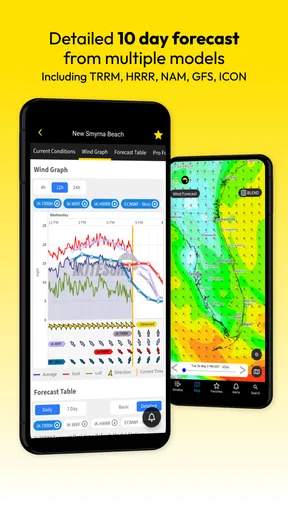
One of the standout features of iKitesurf is its real-time wind data. It pulls in detailed information from thousands of weather stations worldwide. Whether I’m planning a trip to the coast or just a quick session after work, the app provides accurate and up-to-date wind conditions. This is crucial for anyone who wants to maximize their time on the water.
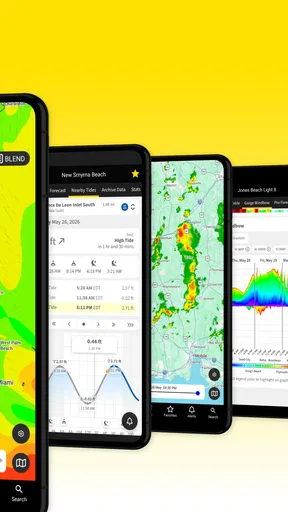
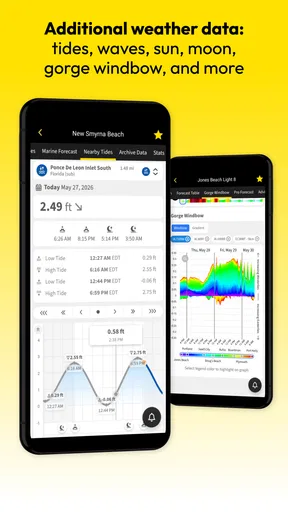
Another feature that I found incredibly useful is the tide and wave forecasts. With iKitesurf, you don’t just get wind data; you’re also informed about swell height, period, and water temperature. For someone like me who loves to plan my sessions around optimal conditions, this comprehensive data package is invaluable.
A useful habit is to compare several nearby spots instead of treating the first promising reading as a final answer. A forecast that looks appealing at one location may not match the conditions at a beach a short drive away. I would check the same set of conditions across likely launch areas, then use local experience to decide whether the difference is meaningful. This approach makes the app a planning aid rather than a substitute for observing the water and wind when I arrive.
For a realistic weekday decision, imagine I have a short window after work and need to know whether it is worth packing my gear. I can check wind first, then look at the tide and wave picture for the places I would actually reach in time. If the outlook is borderline, I can wait for a later update or choose a more sheltered alternative rather than making the trip based on a single attractive number. That small routine can save wasted travel, even when the forecast does not produce a definite yes-or-no answer.
Alerts, community, and the value of checking in
One aspect that really impressed me was the customizable alerts. I set up notifications for specific wind conditions at my favorite spots. So, whenever the conditions are just right, I get a ping, and it’s time to grab my gear! It’s like having a personal weather assistant who knows exactly what I need.
Alerts are most helpful when I treat them as a prompt to look again, not as an instruction to go. A notification can draw my attention to a possible session, but the rest of the forecast and the conditions on arrival still matter. I would keep the thresholds tied to the kind of outing I can realistically make: a quick local session is different from a longer drive that needs more confidence before I leave.
What’s more, iKitesurf has a strong community vibe. There’s a feature where users can share their sessions and conditions, creating a sense of camaraderie. It’s always great to see what other surfers are up to and maybe even discover new spots through their updates.
Those shared reports can add useful context to a forecast, especially when I am considering a place I do not visit often. I would still read them as snapshots from other users, not guarantees that conditions will stay the same or suit my equipment and ability. The best use is to combine that on-the-ground perspective with the forecast, then make a cautious decision based on the whole picture.
What keeps it useful after the novelty fades
I find its lasting value comes less from opening it out of curiosity and more from building a small routine around the places I actually ride. Checking a few familiar spots and treating alerts as prompts to reassess can make each forecast more useful without turning the app into a constant distraction. That habit also makes it easier to judge whether its specialist focus deserves a regular place beside an everyday weather app.
Month-to-month value and alternatives
The longer-term value depends on whether I regularly make decisions around wind and water conditions. Someone who checks forecasts several times a week can build a practical routine: save attention for a handful of familiar locations, use alerts to catch possible windows, and compare the wind outlook with tides and waves before setting off. That repeated process is where a specialist app can earn a place on my phone after the initial curiosity wears off.
For occasional beach visits, a general weather app may be enough. It is often faster for answering everyday questions such as whether it might rain or what the temperature will be. But that broad view is not as tailored to a wind sport session as a service centered on wind conditions and related water information. I see the two approaches as serving different jobs rather than one making the other unnecessary: a general forecast for ordinary plans, and this app when the decision turns on conditions at a particular water spot.
The app has an average rating of 4.8 from 886 ratings, with 106 written reviews, and has been installed over 50,000 times. Those figures suggest that it has found an audience among people looking for this kind of specialist forecast, but they do not tell me whether every station or location will be equally useful for my own routine. The practical test is whether the places I care about have information I can use consistently.
Its current version is 5.0 and it supports devices running Android 5.0 or later. I would think about that compatibility before relying on it for a regular routine, especially if I use an older phone. A quick check that the app runs smoothly on my device is more useful than assuming every handset will feel equally responsive.
Costs, upkeep, and points of friction
Now, no app is perfect, right? While iKitesurf is packed with features, I did notice that the premium version unlocks a lot more data and functionalities. For the most dedicated surfers, this might be worth the investment, but casual users might find the free version a bit limiting.
In-app purchases range from $5.49 to $179.99 per item, so I would not pay simply because I expect every extra to improve every outing. I would first use the free experience to see whether it covers my regular spots and the decisions I actually make. If I keep checking it and find a specific gap in the information available to me, then I can judge whether a paid option addresses that need. The range also makes it sensible to review the purchase details carefully rather than assume there is one simple upgrade suited to everyone.
There is a maintenance cost beyond money: attention. Forecasts are most useful when I revisit them close enough to the planned session to account for changing conditions. That means the app works best as part of a habit, not as something I open once in the morning and treat as settled all day. For people who dislike checking updates or who want a single unchanging answer, this kind of tool can feel like extra work.
Additionally, while the interface is generally user-friendly, there are moments when loading data can take a bit longer than expected, especially if you’re in a spotty service area. This isn’t a dealbreaker, but it’s something to keep in mind if you rely heavily on real-time updates.
That limitation affects how I would use it away from reliable service. I would check the forecast before travelling, while I still have a connection, rather than assume that every detail will load at the beach. And I would avoid making a safety decision depend on an update arriving at the last moment. The app can inform preparation, but a slow connection or an unexpected change can still complicate plans.
Who should keep it installed?
I think it is best suited to kiteboarders, kitesurfers, windsurfers, and other regular water users who care about wind enough to plan around it. It is also a sensible choice for someone who visits different coastal spots and wants to compare conditions rather than rely only on a broad local forecast. If I only go to the beach occasionally, rarely choose activities based on wind, or mainly need rain alerts and a simple temperature forecast, a general weather app may be the easier everyday option.
It is not a replacement for learning a launch site, checking hazards, or asking experienced local riders when I am unsure. Forecast numbers can look reassuring while still leaving important questions about the specific beach and the person using the equipment. I would use the app to narrow down options and time my check-ins, then make the final call with appropriate local judgement.
Final Thoughts
All in all, iKitesurf: Weather & Waves is a fantastic tool for anyone serious about their water sports. It’s comprehensive, user-friendly, and connects you with a global community of like-minded enthusiasts. While the premium features might not be necessary for everyone, the core functionalities offered for free are more than enough to get you started on making the most of your time on the water.
If you’re as passionate about the waves as I am, give iKitesurf a try. It might just become your new favorite app.
Verdict
Strengths of iKitesurf: Weather & Waves
- Accurate wind forecasts for kitesurfing.
- Real-time weather updates and alerts.
- User-friendly interface and easy navigation.
- Community features for sharing spots.
- Customizable notifications for conditions.
Limitations of iKitesurf: Weather & Waves
- Requires premium for full features.
- Limited offline functionality.
- Ads can be intrusive at times.
- Some data may lag in remote areas.
- Battery consumption is relatively high.
Other Releases by WeatherFlow
View All
Tempest Weather
Weather4.3

WindAlert: Wind & Weather Map
Weather4.7

SailFlow: Marine Forecasts
Weather4.8

FishWeather: Marine Forecasts
Weather4.8
Similar Picks in This Category
View All
Weather - By Xiaomi
Xiaomi Inc.4.1

Weather & Radar Forecast
WetterOnline4.8

Weather
OneLouder Apps4.6

AccuWeather: Weather Radar
AccuWeather3.6

The Weather Channel - Radar
The Weather Channel4.6

1Weather Forecasts & Radar
OneLouder Apps4.3
Frequently Asked Questions
What features does iKitesurf: Weather & Waves offer?
iKitesurf provides real-time wind and weather forecasts, live wind reports, and tide information. It also includes interactive maps and charts for more than 50,000 locations worldwide. Users can set custom alerts for wind conditions, ensuring they’re always ready for the perfect session. The app is designed for both casual enthusiasts and professional kitesurfers.
Is iKitesurf: Weather & Waves free to use?
iKitesurf offers a free version with basic features, including access to some real-time data and forecasts. However, for more detailed and advanced features like ad-free usage, extended forecast models, and premium map layers, users can opt for the Pro subscription. Pricing details are available within the app or on the official website.
How accurate are the forecasts provided by iKitesurf?
The app sources its data from multiple reliable meteorological services, ensuring high accuracy in its forecasts. Users report that the real-time wind data and detailed forecast models are particularly precise, making it a trusted tool for kitesurfers. However, like any weather forecasting service, occasional discrepancies can occur due to rapidly changing conditions.
Can I use iKitesurf offline?
While iKitesurf primarily relies on live data and requires an internet connection for the most accurate and up-to-date information, some features, like previously downloaded maps and basic wind conditions, may be accessible offline. It’s advisable to check the availability of offline features before heading out to remote areas.
What devices are compatible with iKitesurf: Weather & Waves?
iKitesurf is compatible with both Android and iOS devices, including smartphones and tablets. The app is optimized for a seamless experience across different screen sizes, ensuring that users can easily access all features whether they are on the beach or at home planning their next kitesurfing adventure.
